Join The Community

Premium WordPress Themes

Search

Tampilkan postingan dengan label Plug-in 3Dmax. Tampilkan semua postingan

Jumat, 05 April 2013

3D PDF exporter for 3ds Max


SimLab 3D PDF exporter Plugin for 3ds Max [2009-2013] (WiN64) | 30 MB

3D PDF exporter for 3ds Max, memungkinkan pengguna untuk membuat  3D PDF files  dari  3ds Max. 3D PDF files dapat dibuka dengan software PDF reader yang biasa kita gunakan. plugin is support dengan 3ds Max 2009-2013  (32 and 64bit.)


Download link
uploaded
letitbit
extabit

Enjoy...

Rabu, 03 April 2013

r|shaders 1.02 for 3ds max

r|shaders 1.02 for 3ds max 2009-2012 
Size: 7.3 MB

r | shader adalah kumpulan shader untuk 3ds max. Rilis Pertama ini bernama "Core Zero" akan menjadi versi dasar danterdiri 8 shader yang berbeda untuk memberikan kemungkinan untuk membuat berbagai jenis permukaan yang alami alami.

8 shader berikut: Es,Laut, Pasir, Salju, Daratan Es, Tanah Salju, Magma dan permukaan Tanah. Dikembangkan selama R & D fase pada proyek-proyek internasional komersial seperti blockbuster film, cinematics videogame, iklan dll. Dengan r | shader, pengguna dapat mensimulasikan banyak permukaan alam dengan menggunakan shader sigle atau pencampuran lebih satu, misalnya, beberapa daerah salju pada suhu dingin yang bisa tampak seperti es.

kompatibel dengan Scanline Render dan Mental Ray, ditambah dukungan umum untuk produk pihak ke-3 seperti V-Ray, FinalRender, Brasil R / S dan NodeJoe / Slate. 

Saat ini r | shader mendukung 3ds Max 2012, 3ds Max 2011, 3ds Max 2010, 3ds Max 2009 (32/64 bit)


Download link
filepos

Selasa, 02 April 2013

Gugila GroundWiz PRO v1.8 For 3DSMAX � XFORCE

Gugila GroundWiz PRO v1.8 For 3DSMAX � XFORCE

GroundWiz adalah plug-in untuk 3ds Max untuk membuat pemandangan alam dengan mudah dan presisi. GroundWiz terdiri dari tiga bagian utama: GroundWiz Procedural Terrain Map, GroundWiz Planter and GroundWiz Variation Map untuk 3ds Max. 

Saat ini GroundWiz mendukung 3ds Max 2012, 3ds Max 2011, 3ds Max 2010, 3ds Max 2009, dan 3ds Max 2008


Download link
turbobit
freakshare

Sabtu, 23 Februari 2013

Progresive Realistik render : I-RAY

Hai kali ini kita mau berbagi info pencahyaan realistik menggunakan I Ray ( bukan Vray ), lihat video dibawah untuk penjelasannya ya,...


Download HI RES Video Progresive Render I Ray
Download link nya tukeran sama posting di FB atau Twitter buat bantuin kita menyebarkan info2 yang bermanfaat, klik link "Pay with Tweet or Facebook" dibawah ini untuk download Video Progresive realistic render with I-Ray :


Yang mau cari Video Tutorial 3DS Max klik link dibawah ini :
Video Tutorial 3DS Max Bahasa Indonesia

Rabu, 06 Februari 2013

Review 3DS Max 2013 : Mass FX Enhance

Hai liat ini nih, video review 3dss max 2013 siapa tau nemu secret ilmu :)


Kalau suka tolong di share ya ke teman2 yang lain tinggal pilih mau share pakai FB atau mau Twitter :


Kamis, 31 Januari 2013

FREE SCRIPT /PLUGIN : WEBING (jaring laba2)

Bagi kalian yang mau download free script/plugin untuk membuat jaring laba2 atau jaring laba2 yang suka ada di barang2 yang dirumah kosong silahkan .

Sample Image :


nah bagus khan hasilnya,...okay silahkan download,..halal kok (original )

oya download link akan automatis keluar setelah kalian klik tombol "pay with tweet " dibawah,...post atau tweet tentang komunitas 3D,...dukung kami lah biar berkembang, toh kami juga sudah banyak berbagi ke kalian bukan :)

Silahkan klik "Pay with tweet or facebook " dibawah ini setelah itu download link akan otomatis keluar :) 


Senin, 21 Januari 2013

Pencahayaan dengan VRAYsun & HDRI sky

Hai,..kalau kalian suka denga pencahayaan ada video bagus buat kamu silahkan di simak


- KOLEKSI VIDEO TUTORIAL 3DS MAX
- Harry Riyadi Twitter : https://twitter.com/3D_Harry
- Youtube channel : http://www.youtube.com/user/Komunitas3D

Senin, 14 Januari 2013

BOXX Technologies : Render

BOXX ini keren banget, sebenarnya udah lama di barang keluar cuma baru inget aja gw untuk di posting,...ini mesin bisa ngerender layaknya gundal putra petir,...liat reviewnya dibawah :


BOXX Official site :
http://www.boxxtech.com/Products/renderpro
http://www.boxxtech.com/Products/renderboxx-10600

Rabu, 19 September 2012

Sigertools Vray Studio Set up Pro

Dengan menggunakan Sigertools, kamu sudah bisa meng otomatiskan sisitem set up pencahayaan kalian, Sigertools sudah kompatibel dengan :

3ds max 2010 SP1, 2011, 2012, 2013 | V-Ray 2.0 and above | 32 and 64 bit.

Official Site : Sigertools


Sigertools Vray Studio Set up Pro Top Features:

  • Live creation of Studio Setups.
  • 15 different lighting setups supporting Small scale, Medium scale and Portrait studio.
  • Quick access to all of the items properties.
  • Completely customizeable generated Platform Objects (shape, length, height, width, roundness, material, etc.).
  • Completely customizeable generated Light Assemblies (light parameters, shape, length, width, etc.).
  • Completely customizeable generated Reflector Assemblies (color, shape, length, width, etc.).
  • Adapts V-Ray settings depending on choosen resolution.
  • Switch between Low and Production settings in one click.
  • Extended System of Presets.
  • Compatible with 3ds Max 2010/2013.
  • Compatible with V-Ray 2.0 and above
  • Friendly and simple interface

Jumat, 14 September 2012

Free Plugin : Forest Pack

Render Massive Scene di Mental Ray dan VRay

Render dipercepat menggunakan native shader untuk Mental Ray dan VRay dengan native proxy atau object mesh. Sebuah scene dapat mencakup 100.000 pohon dengan masing-masing
1 juta polys , dan render hanya dalam beberapa menit.

Paket hutan dioptimalkan untuk kecepatan. dan dapat membuat lebih dari 500.000 pohon per detik di viewport, memodifikasi parameter apapun dan membangun kembali mereka secara real-time.

dapat membuat film yang realistis dengan fitur animasi nya. Cukup gunakan object animasi atau proxy, Forest Pack akan mengulang dan mengacak / randomize object di TKP.

Menggabungkan dengan native shader, Anda dapat membuat area animasi vegetasi yang besar, kerumunan orang atau hal lain yang mungkin anda bayangkan atau inginkan.

Download Plugin nya dan Tutorialnya disini : CLICK HERE 

Kamis, 09 Agustus 2012

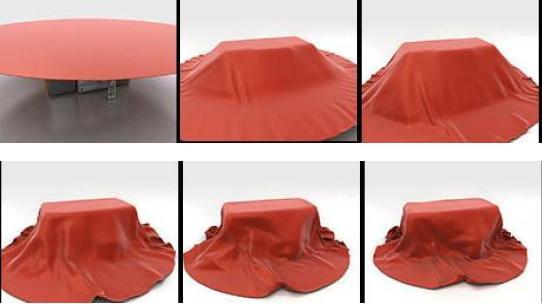
Free Plugin : SimCloth3 v1.84

Plugin untuk membuat animasi kain di 3DS Max kamu, silahkan download : Disini


Video tutornya :

Kamis, 16 Februari 2012

Vray Sun System

Di sini yang kamu lihat Versi Lite nya (gratis) dan di Video 2 Kamu dapat melihat Beta awal Versi Pro (dalam Progress) dengan 15 preset (HDRI Images) ...
Info Tambahan:

instalasi:

setelah menginstal go to cutomize -> ono `s script


Click Here : Download
VIDEO TUTORIAL VRAY : Click here

FREE : Wave Generator


Download
: Download Plugin

Ingin membuat scene lautan dan pingin bikin ombak yang realistik lengkap dengan buih nya, nah ini dia jawabanya silahkan didownload gratis kok, yang bikin wave generator ini cuma minta donasi seikhlasnya aja dari Paypal,...kalo gak ngasihjuga gak papa, tapi kasian juga kalo gak ngasih udah bikin cape-cape,...yah terserah temen-temen aja


Rabu, 15 Februari 2012

REALISTIC LIGHT WITH MENTAL RAY


Pelajari cara menggunakan Global Illumination dan Final Gather tools sakti dari Mental Ray untuk menghasilkan pencahayaan realistik yang cepat dan Efisien


Harga Video Tutorial : Rp. 45.000.-
ONGKOS KIRIM GRATIS
  • Hi Resolution : 800 x 600 pixel
  • Untuk pemesanan sms : 0813 22 57 27 07
  • Isi SMS : " Berminat dengan Video tutorial Mental Ray "
  • Sistem pengiriman : Download
  • Transfer : Rek BCA 2332391675
  • Mandiri ke BCA sudah bisa transfer langsung


Komunitas 3ds Max


Sabtu, 28 Januari 2012

Shader & Material : GRATIS

Hai,..met pagi,...... :)

Kali ini saya posting untuk kalian yang sudah lama mencari shader & material buat max kalian,...shader yang saya bagikan kali ini dari evermotion mangga silahkan di download,...it's free....dan legal yah bukan bajakan :)


Kalau mau download silahkan klik dibawah ini, tolong budayakan share yah link komunitas 3d ini,...agar semakin berkembang lagi dan semakin bisa memberikan kontribusi info berharga yang gratis buat 3ds max lovers,..

Untuk share klik disini :

Share


Download
Download
Download
Download
Download

Minggu, 15 Januari 2012

Vray Tips by Vlado

Vlado's VRay Guidelines

I've been asked many times what are "good" VRay settings. Of course, there is no universal answer and it depends on the desired render speed and quality, but here is a set of settings that I have found to work very well for still images in many situations. Please note that these settings are not optimal, in the sense that with enough tweaking, you can probably get similar quality with faster render times. The beauty of these settings though, is that they require almost no tweaking and you are guaranteed to get a nice result in the end.


Vlado's Guidelines


Provided that you start with a default VRay renderer:


(*) In the Image sampler rollout, switch to "Adaptive QMC".
(*) Set the "Max. subdivs" to 100 (one hundred). Leave the "Min. subdivs" to 1.
(*) Set the primary GI engine to QMC GI. Do not change the subdivs.
(*) Set the secondary GI engine to Light cache.
(*) Set the light cache interpolation samples to 5.
(*) Set the QMC Sampler "Adaptive amount" to 1.0.
(*) Un-check the "Clamp output" option in the Color mapping rollout.
[*] Typically you will need to adjust the Noise threshold as the default produces too much noise. A good value is 0.001.
(*) You are done.

To control render quality vs render time:


(*) Adjust the QMC Noise threshold. Lower values reduce noise, but increase render times.
(*) Adjust the light cache subdivs. This is scene dependent, but usually values from 1000 to 5000 are enough for most scenes. You can also adjust other light cache parameters as necessary.
(*) Turn on or off reflective/refractive GI caustics as needed.
(*) Optionally turn on the "Use light cache for glossy rays" option to speed up glossy reflections.
(*) You may want to adjust the render region (bucket) size for faster feed-back.


Vlado's Guidelines


Notes:


(*) Leave all subdivs anywhere at their default values. They won't have any effect anyways - the 100 AA subdivs will almost certainly override everything else.
(*) For builds of VRay before 1.49.30, DO NOT use color mapping other than Linear. Otherwise, you risk to get an incorrect result in the end. If necessary, apply color correction in post. You can change the dark/bright multipliers, provided that you leave both at the same value.
(*) Avoid using sharpening AA filters. They can make the noise more apparent.

Advantages of these settings:


(*) Very little parameters for controlling render quality.
(*) Work for a very large number of scenes.
(*) Typically produce high-quality results.

Disadvantages of these settings:


(*) May be slow to render. With tweaking, you may get faster results.

How it works:

The high AA subdivs essentially causes all the sampling to be performed by the image sampler. It will take as many samples per pixel as required to achieve the specified noise threshold. In many ways, this is similar to PPT, but is done on a per-bucket basis and the number of samples is adaptive.

Best regards,
Vlado

Selasa, 18 Oktober 2011

FREE PLUGIN/SCRIPT : Plugin 3D

Share


Message ke teman tentang tutorial ini


Mungkin banyak yang belum menyadari fungsi dari plugin ini, plugin ini bisa membantu kamu untuk bekerja lebih cepat dengan 3ds max kamu, jadi begini fungsi dari plugin ini adalah menanam sebuah engine di 3ds max kamu untuk melihat hasil di viewport kamu tanpa harus kamu merender terlebih dahulu, bermanfaat bukan,...!! jadi gak perlu repot nunggu hasil renderan yang lama, cukup dengan plugin ini kamu hanya tinggal lihat viewport kamu di 3ds max dan SIMSALABIM kamu bisa lihat deh hasil nya....

Spec :

Windows 32 & 64 Bit XP/2000/Vista/Windows 7.
32 & 64-bit Autodesk 3ds max. Supports Max 9, 2008, 2009, 2010, 2011 (Max bug causes slow loading with external plug-ins).

Tutorial nya disini : Click here

Downloadnya disini : Click here

FREE PLUGIN/SCRIPT : Pulldownit

Share


Message ke teman tentang tutorial ini


Dulu saya pernah posting mengenai plugin/script ini, karena banyak yang nanyain lagi ya jadinya saya posting lagi deh, fungsi dari plugin/script ini adalah untuk membuat efek meruntuhkan object 3d yg ingin kamu runtuhkan. Ada dua versi download dari plugin/script ini yaitu versi standar dan versi profesional, yang standar free dan memiliki batasan fungsi, sedangkan yang profesional harus bayar tapi tidak memiliki batasan fungsi, kalo menurut saya yang standar lumayan juga lah

FEATURES

* Fast, accurrate rigid bodies solver.

* Fracture capabilities.

* Animation friendly.

* 32 and 64 bits version.

Version Requirement:
2008.2009,2010,2011

Tutorialnya disini


Download disini


Kamis, 13 Oktober 2011

FREE PLUGIN/SCRIPT : Advanced Painter

Share


Advanced Painter adalah modular brush-based distribution tool derrived dari Nature Painter script. Plugin/script ini mempunyai 7 jenis tools:


  • * Rumput: untuk membuat rumput, Rumput: untuk membuat rumput sederhana
  • * Rambut [NEW]: digunakan untuk membuat rambut sederhana / bulu (atau sebagai panduan untuk Shag rambut: rambut
  • * Randomizer [NEW]: variasi dari Scatterer digunakan untuk mendistribusikan secara acak objek yang kamu pilih.
  • * Batu: untuk membuat batu sederhana dan Peebles.
  • * Spaghetti: spaghetties, mie, kabel dan lain nya.
  • * Scatterer [updated]: Tools untuk menyebarkan objek ( generik tapi sngt bermanfaat )
  • * Pasta gigi: menyenangkan tetapi Generator pasta gigi tidak terlalu berguna.
CARA INSTALL :
  1. Extract advPainter_1.5.1.mzp
  2. Start Max. MaxScript>Run Script ... and choose the extraced file. A dialog box will inform you that installation is successful.
  3. Install Advanced Painter action item (found under 'Painter' category) to your toolbar, main menu bar, or quadmenu. You set up a shortcut key or menu item for Advanced Painter the same way you would configure a regular 3ds interface item. Go to Customize / Customize User Interface, change the category to 'Painter' and assign a shortcut. Click ok. Voila. If you are having difficulty installing Advanced Painter or any other script, try checking out the script installation page, especially the videos demonstrating the process.
CARA UNINSTALL :

Uninstalling Advanced Painter: During setup, the the following files are copied. If you wish to uninstall Advanced Painter just delete them yourself.

[maxroot]\stdplugs\stdscripts\Functions_AdvPainter.ms
[maxroot]\UI\macroscripts\Macro_AdvPainter.mcr
[maxroot]\scripts\AdvPainter\Ink_Grass.ms
[maxroot]\scripts\AdvPainter\Ink_Hair.ms
[maxroot]\scripts\AdvPainter\Ink_Randomizer.ms
[maxroot]\scripts\AdvPainter\Ink_Scatterer.ms
[maxroot]\scripts\AdvPainter\Ink_Spaghetti.ms
[maxroot]\scripts\AdvPainter\Ink_Stone.ms
[maxroot]\scripts\AdvPainter\Ink_Toothpaste.ms
[maxroot]\scripts\AdvPainter\Ink_Example.txt
[maxroot]\scripts\AdvPainter\Ink_Template.txt
[maxroot]\scripts\AdvPainter\scatterer_i.bmp
[maxroot]\scripts\AdvPainter\scatterer_a.bmp

Version Requirement:
3ds max 5-2009 (32/64)

DOWNLOAD : advpainter_1.5.1.zip
advpainter_1.6.0.zip

Rabu, 12 Oktober 2011

FREE PLUGIN/SCRIPT : GhostTown

Share


Sorry lagi males nulis, baca aja sendiri, ini plugin / script buat bikin kota secara cepat.... :)


A city generator and tool for creating urban environments.

  • Lopoly or highpoly buildings
  • Roadtool for making basic road layouts
  • Easy material system, add your textures and they will be randomly distributed
  • Add details were needed with basic scripts for facades etc

Custom scripting and support for openstreetmap coming soon

Additional Info:

New version GT 0.251

- Added customscript option
- Checking for update is disabled by default, turn it on/off in the menu
- Undocking works (must be done via the menu)
- Fullscreen doesn't affect the ribbon
- Import objects as proxies (vray, mr coming)
- Improved alot of stuff

Version Requirement: 3ds Max 2011

DOWNLOAD : http://www.kilad.net/GTForum/viewtopic.php?f=2&t=2

VIDEO TUTORIAL : http://www.youtube.com/watch?v=24jWrVxE8gw

Galery image :